Like many of you, I prefer to shoot in RAW. The well established reason is that it gives me more information to work with in post processing … more latitude in “tweaking” the image if necessary. My second choice (when I have to) is RAW + JPG. It’s a second choice because then I have twice as many files to deal with plus, it sucks up more memory on my SD card and on my computer. But, of course, some cameras in some cases force you to shoot JPG.
The Olympus OM-D E-M1 actually does a pretty good job of automatically changing the image quality setting to one that is compatible with whatever camera function you’ve selected … but, not always. In Gary Friedman’s recently released, excellent book about the E-M1, you will find a table showing you how the camera behaves with different settings. So, below you’ll find a short excerpt from his book that will hopefully clear up what the camera does in those different situations.
———————————————————————————–
Excerpt from “The Complete Guide to Olympus’ OM-D E-M1” by Gary L. Friedman
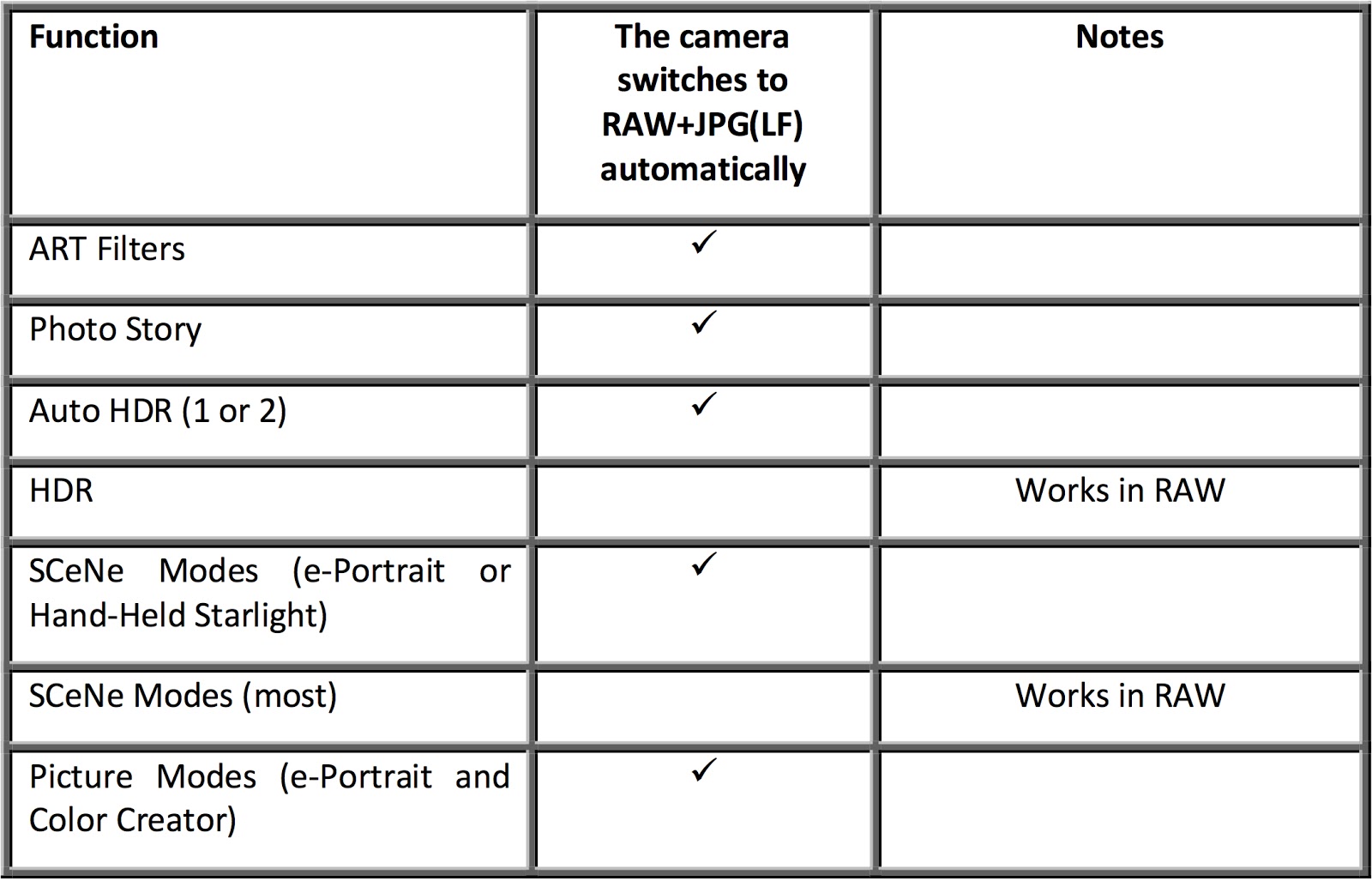
The E-M1 offers many advanced bells-and-whistles, which are not all compatible with RAW mode. And the ones that don’t support RAW, will (sometimes) silently switch to RAW+JPG (LF) shooting while you use them and then switch back when you’re finished. Which features are incompatible with RAW, and how does the camera behave for each? A comprehensive table appears below:
So, here’s what you really have to remember … a RAW file is always a RAW file and few of the fancy camera settings (except exposure, of course) will apply. The camera may show you the effect in the EVF/LCD, but the RAW file will NOT record that effect. So for those cases where the camera does not automatically switch to RAW+JPG, it is only showing you a preview of what the effect “could” look like.
Fortunately, the Olympus editing software, Olympus Viewer 3, will let you apply all of the in-camera effects to a RAW file on your computer, after the fact. Those include Art Filters, Picture Modes, Color Creator, and Highlight & Shadow Control.
————————————————————————-