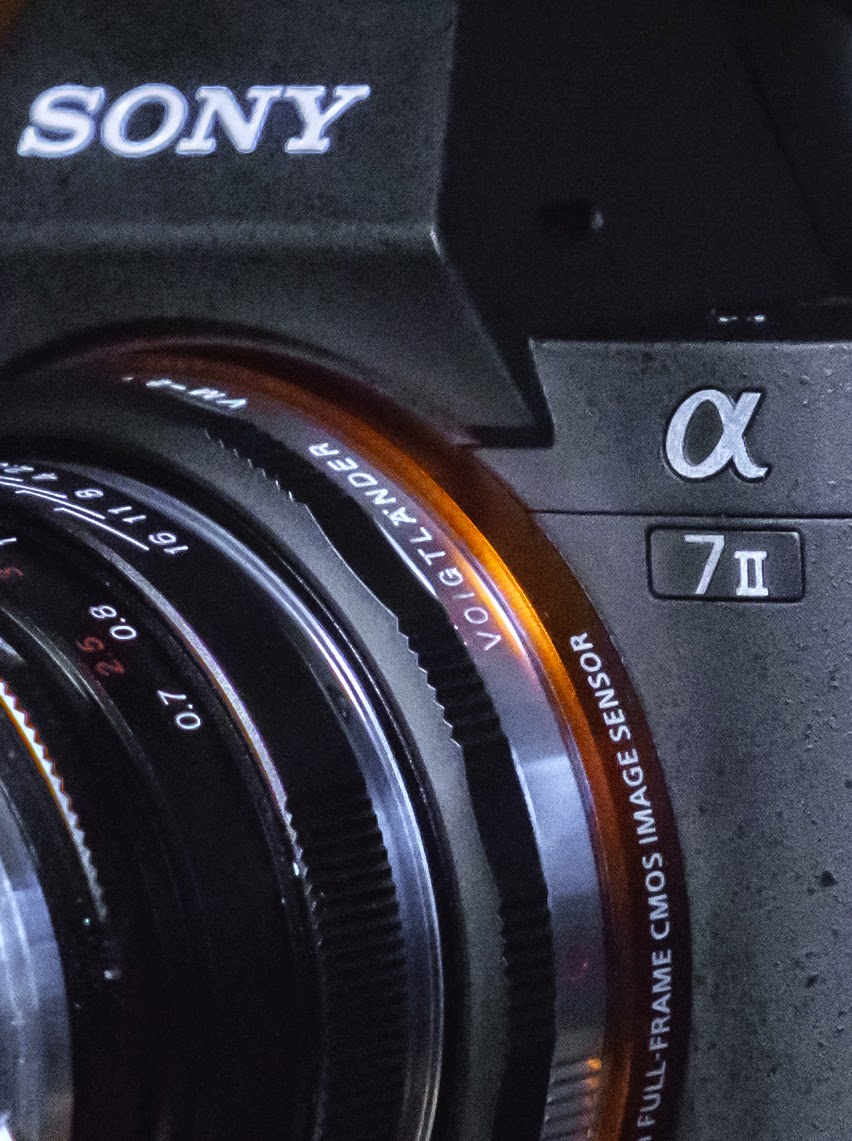
What do You call the Sony A7II ?

Why do camera manufacturers have such a difficult time coming up with consistent and simple naming schemes for their cameras?  For instance, when the Olympus OM-D E-M5 first came out there seemed to be a fair amount of confusion about what to call it … the OM-D … the E-M1 … or did you need to refer to the entire combination?  Well, that was cleared up when Olympus announced the E-M1, setting the OM-D as a series name and E-M1 as a specific camera in that series.

Now, with Sony there seems to be some uncertainty about just what exactly do we call the new A7II.  On the Sony website, it is called the ILCE-7M2 (now there’s a mouthful … interchangeable lens camera Extraordinaire?), and on the camera the designation is 7II.  But here’s the rub.  I’ve also seen (and heard) this camera referred to as the:

  • A7II
  • A7M2
  • A7 Mark II (or A7 Mark 2)
  • A7Mk2
  • A7MkII

Lots of choices!  (oh, and I think it’s also okay to insert small “a” instead of capital “A”)

Yeah, I know … a big fuss about nothing … who cares?  Well, I do!  I haven’t slept a wink since it was announced!  🙂  No, actually I was just curious.  What’s your preferred title for this new kid on the block?

E-M1 Firmware Version 2.0 eBook Now Available – Free!

I just finished a comprehensive guide to Firmware Update Version 2.0 for the Olympus OM-D E-M1.  It’s now available for FREE download at The Friedman Archives.  If you’d like to get it, please send an email request to Gary Friedman.

The eBook is available as a .pdf file, .mobi (for Kindle), or .epub for other e-readers.  So you should be able to read it on just about any device that you may own … whether it be a tablet, phone, or computer.

Don’t forget to check out the other camera and photography books available at:
www.FriedmanArchives.com

Last Minute Opportunity to Attend Photography Seminar – Oct. 18-19

There are still some openings for one of Gary Friedman’s widely acclaimed High-impact Photography Seminars.  I realize this is very short notice since the two-day seminar begins tomorrow at 10:00 AM in Los Angeles, but here is your chance to learn the secrets to taking “Wow!”-type images and what is really important in photography.

Gary’s well known website, The Friedman Archives, is a great place to view his amazing images from all over the world, pick up a great ebook about your camera, or sign up for one of his seminars.

You can find out all of the information about the seminar and sign up for it here:

The full two-day seminar is only $125 and will be held in Los Angeles:
Acme Theatre (Yes, that’s the real name)
135 N. La Brea Ave
Los Angeles, CA 90036

E-M1 Firmware 2.0 Brings Live Composite Feature

The Olympus OM-D E-M10 came with a feature found on no other OM-D camera (or possibly any other camera), and that feature was called Live Composite.  It’s a way of “sort of” doing time lapse photography, but with each successive image added to all the previous images, much like using the Lighten Blending mode to merge layers in Photoshop.  Now, FW 2.0 brings this great function to the E-M1.

With this first image, I used Live Composite with the overall exposure set to underexpose by a couple of stops.  Then, I just slowly added soft light to the parts I wanted to brighten, all the while watching the image develop in real time on the LCD.

To use Live Composite (LC), you have to go to Manual and pass through all of the slow shutter speeds, past Live Time and Bulb.  Once you’re in LC, you’ll be able to adjust your shutter speed by pressing the Menu Button to access that menu.  However, before you go to LC, I suggest doing some test shots in manual to determine your base or starting exposure.  Once this is set and you begin the LC exposure, the dark areas won’t increase in brightness, only parts of the image that are brighter will be added, and only up to the set exposure.  I know this is a little confusing, but as soon as you use it once or twice, it will become very clear.  One other tip … you should use a tripod for this.

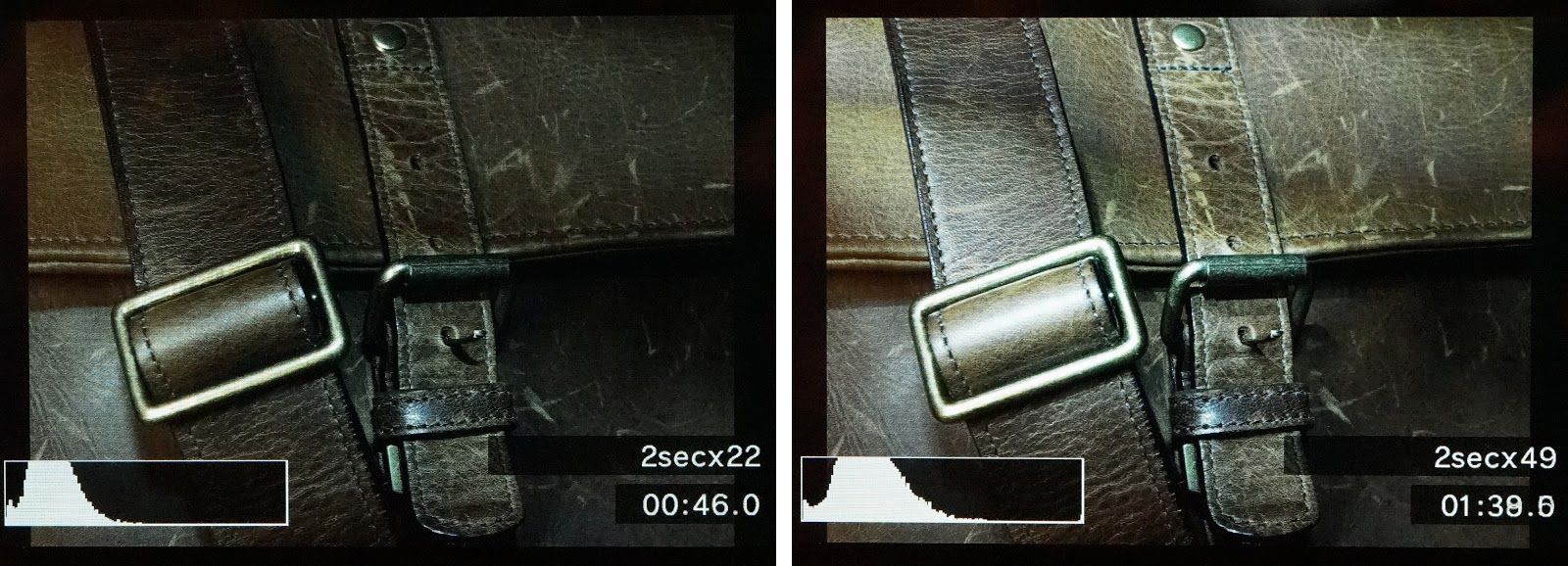
In the above photo, the image on the left shows the result after 22 exposures (46 seconds), while the right one shows after 49 exposures. The only increase in brightness is from light painting that I did with a flashlight. This also shows the display you will see on your camera, showing total elapsed time, your set shutter speed and number of exposures, plus a histogram to help you judge the correct (desired) exposure.

Live Composite should be a great tool for capturing star trails or car light trails. Or, how about getting that smooth look on flowing water or fast moving clouds. I think it’s perfect for light painting, too, but just use your imagination to come up with lots of new applications and then be sure and share your ideas with the rest of us.

This is a very brief introduction, but I go into more detail in an ebook I’ve written, a comprehensive guide to Firmware Update Version 2.0 for the Olympus OM-D E-M1.  It’s now available for FREE download at The Friedman Archives.  If you’d like to get it, please send an email request to Gary Friedman.

Olympus Firmware Update 2.0 Released for OM-D E-M1

OM-D E-M1 Firmware Update Version 2.0 Available Here

Update:  Olympus has actually issued a revised, version 2 Camera Manual
that incorporates these changes.

The new firmware, version 2.0, for the Olympus OM-D E-M1 is a major update.  With over 24 improvements and new functions, some major but all significant, I think every E-M1 user will find something to love.  There’s even a new software package coming next week (Sept, 24th) to support tethered shooting … nice!

In fact, we’ll just start there.  Olympus’ new “Tethered Shooting System Software”, called “Olympus Capture”, will be ready for download on September 24, 2014.  It will be available for both Mac and Windows, and should be very helpful in Pro Studios and home studios, too.

Here’s the link to the website:  Olympus Capture Software

Below, is the Olympus official list of new functions and operability improvements.

8 New Functions:

  • Tethered Shooting via the new Olympus Capture Software 
  • Live Composite mode
  • Keystone Compensation (digital shift) to correct vertical distortion.
  •  2 New Art Filters: Vintage and Partial Color.
  • Aperture Lock function has been added to Aperture Preview.
  • Panning Shot shooting mode has been added to SCN mode.
  • Old Film effect has been added to movie effect.
  • New Photo Story mode features: Zoom In/Out and Layout framing options. Save (complete partway through), Temporary Save, and Resume functions.

16 Operability Improvements:

·       EVF image display time lag reduced to 16 milliseconds (when frame rate setting is set to high speed).
(My Note:  Don’t forget … Frame Rate (Custom Menu D) is grayed out and defaults to “normal” if you have Focus Peaking turned on.)
·       Multiple simultaneous settings now available in Live Guide.
·       Exposure compensation (±3 EV) is now available in HDR 1/HDR2 shooting.
·       A function has been added to cancel Color Creator and return to the original Picture Mode by pressing the MENU button when using Color Creator function.
·       Movie Tele-converter can now be used simultaneously when Art Filter is set to Picture Mode.
·       AF function for each frame was added to Custom Self Timer. In Drive Mode’s Custom Self Timer settings, you can now press the INFO button to change settings.
·       MF Assist is now supported in magnified frame position.
·       3x has been added to high resolution magnified Live View.
·       The Peaking display frame rate has been improved.
·       Electronic zoom speed setting function was added. An icon appears on the LCD monitor when using an Olympus electronic zoom lens.
·       When the arrow pad is set to Direct function, the Underwater/Underwater macro functions can be used with the left and down button on the arrow pad.
·       Double tap is now supported in touch operations on the Super Control Panel.
·       The level gauge and histogram can now be displayed during magnified frame display. The Touch Off icon was added to magnified frame display.
·       A function was added so that shooting information recorded in HDR1/HDR2 can be viewed in the playback screen.
·       Information on composited number of shots for images recorded with Live Composite was added (Can be checked in Olympus Viewer3).
·       When the BKT button is held down, the BKT menu now appears.

Plus, Olympus Image Share App Ver. 2.4 is now supported.

I’ve written a comprehensive guide to Firmware Update Version 2.0 for the Olympus OM-D E-M1.  It’s now available for FREE download at The Friedman Archives.  If you’d like to get it, please send an email request to Gary Friedman.

Don’t forget, the definitive guide to the Olympus OM-D E-M1 is available at The Friedman Archives.

"The Complete Guide to Fujifilm’s X-T1" – by Tony Phillips

My timing has been just about perfect.  I got the X-T1 just a couple of weeks ago, and yes, there has been a learning curve after using the Olympus E-M1 for almost a year.  But help is here now.  🙂

Tony Phillips, at The Friedman Archives, has just released his ebook all about the Fujifilm X-T1, and it’s a good one.  He also wrote a book about the Fujifilm X100s and that experience shines through in this book.

Inside Tony’s “Complete Guide to Fujifilm’s X-T1“, you’ll find over 500 pages of comprehensive and thorough information about every aspect of using the X-T1.  Tony writes in a very clear, understandable style and presents lots of insider tips and techniques.

While the book is geared toward experienced photographers, don’t shy away if you’re not one … there are also several chapters filled with general photography how-to’s.

For one reasonable price, you get all three electronic versions of the book:  a .pdf file (read it on just about any device), a .mobi for your kindle, and .epub for a Nook or other e-reader.  It’s also available in print (color or b&w), but those will cost a bit more.

__________________________________________________

And don’t forget, there are lots of other books available at The Friedman Archives.  You’ll find books about almost every Sony DSLR or Mirrorless camera released in the last few years, and a great book about the Olympus OM-D E-M1, along with the two Fujifilm titles.

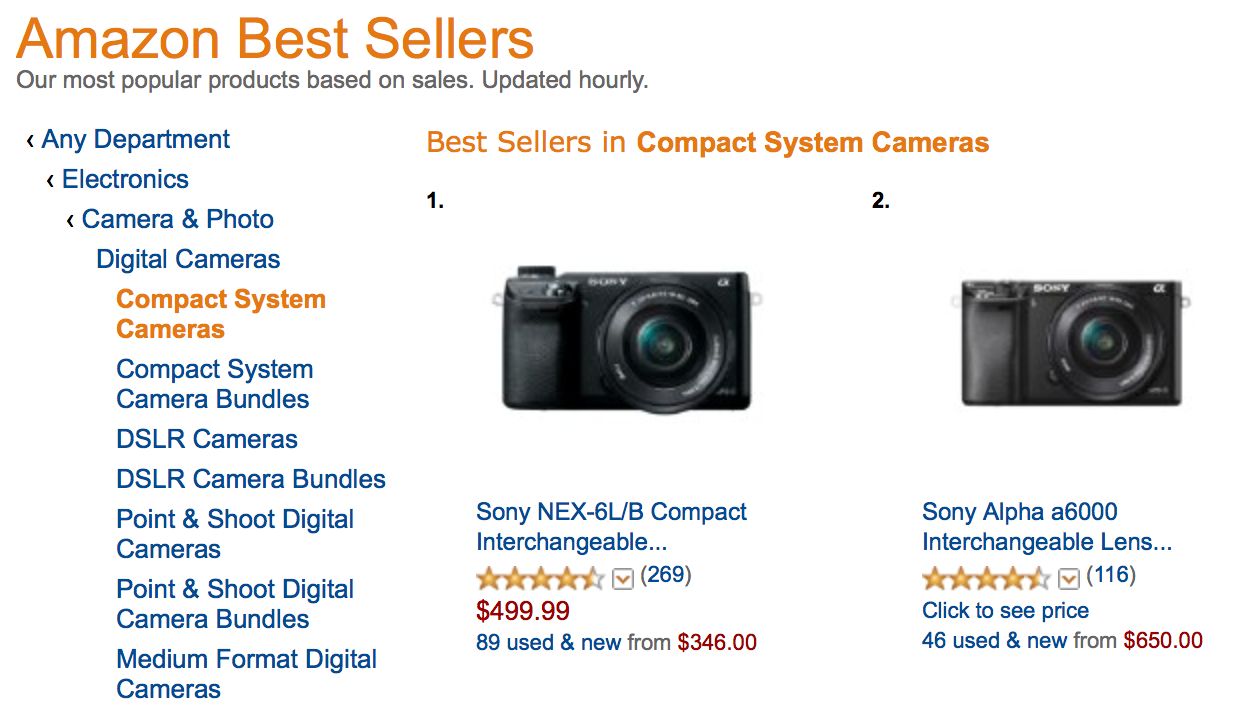
Two Years and STILL a Best Seller … the Sony Nex-6

It’s hard to believe that the Sony Nex-6 has been out for almost two years and it’s still at the top of the Compact System Best Sellers on Amazon!  And what’s more, it’s still at number ten when looking at All digital cameras.

When I wrote the book about the Nex-6 (sorry, shameless self-plug), I knew it was (is) an excellent camera.  But in the last two years, there have been some terrifically competitive cameras released by Olympus, Panasonic, Samsung, Fuji, and even Sony.  The Fuji X-E1 with kit lens can be found for around $600 these days.  Yet, the little Nex-6 continues to thrive.  The Sony A6000 bumped the pixel count up to 24MP and improved the autofocus, yet the Nex-6 is still selling better.  I wonder why?

Plus, when you look at the top ten of all digital cameras, you see that Sony has three of those, with the other seven spots filled by Nikon, Kodak (Kodak ?!?!), Canon, and Olympus.  Amazing!

Do you think the “Mirrorless Revolution” is finally catching on?

For you Nex-6 shooters, to what do you attribute the amazing success of that wonderful little camera?

And for those of you who may be new to the Sony Nex-6, if you’re having any questions about various features and how they all come together in a logical way, help is available at The Friedman Archives.  Gary Friedman and I co-authored a comprehensive book all about the Nex-6/5R/5T.  We’ve had great reviews and even offer a money back guarantee if you don’t learn at least one thing.  🙂