The Leica Q has been on my wish list since I first read about it when it was announced on June 10, 2015. Why? Well first, it’s made by the renowned German camera maker, Leica, plus it has a full frame sensor, fast Leica Summilux lens, excellent EVF, and for me the image stabilization is important. I kept trying to get the same general features but at a lower cost by using different cameras, and I thought maybe the Ricoh GR would scratch that itch since it had the 28mm lens and an excellent APS-C sensor. It didn’t. In the end, I think it came down to the fact that I had never used a Leica and I just wanted to … Continue reading “The “Q” … My First Experience with a Leica”
Author: Mike Hendren
Corrected: Olympus OM-D E-M1 (and E-M5II) Back Button Focus
Some reader’s questions enlightened me to the fact that I didn’t have all of the necessary information in this post, so I’ve tried to rectify that. Sure hope it helps. 🙂
“Back Button Focus” refers to a way to engage autofocus (AF) on your camera separately from the shutter button, and is the preferred technique for many photographers. The big benefit (for me) is that it allows me to stay in Manual Focus (MF) while retaining the capability to AF if I want to. In practice, it allows you to use AF and then automatically revert back to MF so you can refine if necessary. Then, you can expose, compose, and shoot without worrying about the focus changing when you take the shot. Plus, it enables you to tweak the focus if necessary. It’s also handy in the studio, so you can focus on your subject and then not worry about possibly changing the focus point every time you press the shutter button.
The beauty of the way I set up my E-M1, is that with just a flick of the Lever, I can easily get back to full AF with the shutter button. So here’s one way to do it … there are probably others. Go into the Custom Setup (Gear icon) – Menu B (Button/Dial/Lever) – Lever Function and set it to Mode 5. The first 4 modes essentially change which dial or button is used to change WB and ISO. I prefer to do that in either the SCP (Super Control Panel) or set my Right and Down Arrow Keys for those functions.
There are also two other settings required for this to work. First, you must keep the AEL/AFL Button configured to AEL/AFL: Custom Menu B – Button Function – AEL/AFL Function – AEL/AFL. Second, go to Custom Menu A – AEL/AFL, press the OK Button, select MF and press OK again. Now, set MF to mode 3 and press OK one more time. If you also like using Back Button Focus when in S-AF, then set S-AF to mode 3, also. BUT, if you set S-AF to mode 3, you lose the AEL functionality of the AEL/AFL button when the lever is in position 1.
Continue reading “Corrected: Olympus OM-D E-M1 (and E-M5II) Back Button Focus”
Sony A7RII Delayed Temporarily
In my Last Post, I talked about the recent mishaps leading to my decision to buy the A7RII. It turns out, that decision will have to be delayed for a short while.
Recent serious problems with my computer forced me to buy an “unplanned” new laptop. This understandably put a slight kink in my budget, so I’ve gone back to the Sony A7II until I can catch up with my finances.
Now, this is not a bad deal in any way. The A7II is a fantastic camera, only a step behind the A7RII. The biggest difference as you all know is in the resolution, 24MP vs a newly designed 42MP sensor. Of course, the newer A7RII also sports some very nice refinements, notably in the EVF and AF, and reportedly a possible improvement in the 5-Axis SteadyShot INSIDE image stabilization system.
So for the near future, it’s the A7II and just like before … I’m loving it! 🙂
My Digital Experience … The Madness Continues
![]() |
| Image from Sony.Net |
For great ebooks about your favorite camera, if it’s a Sony, Olympus OM-D, or Fujifilm, be sure and take a look at www.FriedmanArchives.com.

Update: Exposing Olympus OM-D E-M10 (and E-M1/E-M5II) Myths – HDR and the EVF
E-Book for the Olympus OM-D E-M5 Mark II
There’s a brand new e-book already out, all about the Olympus OM-D E-M5 Mark II. Professional photographers Gary L. Friedman and Tony Phillips have collaborated to quickly release this new book, and it’s another good one! You’ll find it provides the shortest learning curve for this infinitely configurable camera.
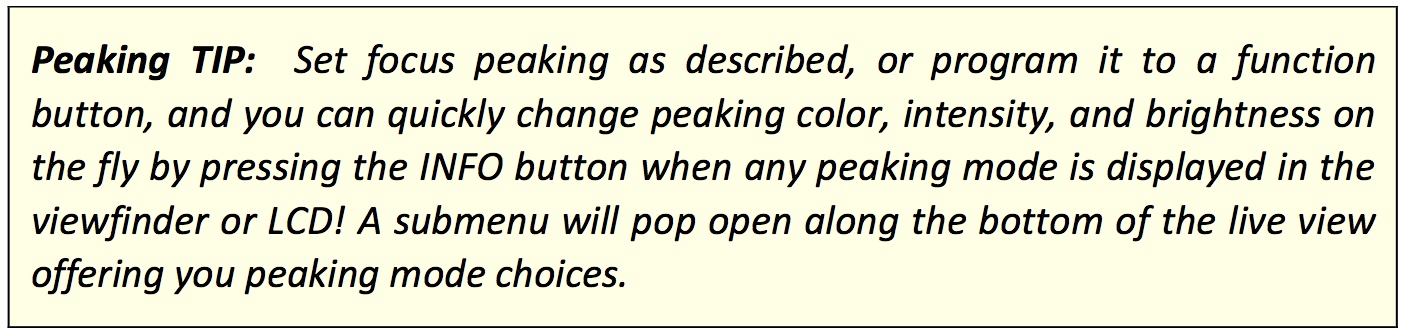
The book is very well written in the usual easy-reading style you find in all of the camera books from The Friedman Archives. In its 430 pages, there is great coverage of virtually every button and function on the camera, with lots of photos, examples, tips, and tables. Speaking of tips, here are a couple of good ones straight from the book:
I’ve read several camera books by both of these guys and always appreciate the thoroughness and depth they provide. I highly recommend this book for new (and experienced) E-M5II shooters. Plus, with the money-back guarantee, you really don’t have much to lose. So head over to The Friedman Archives for all of the details.
And don’t forget to look around while you’re there. Gary has many outstanding images, and there are books about virtually all of the recent major cameras from Olympus, Sony, and Fujifilm.
What You Need to Know about Your Olympus OM-D’s Weather Sealing
![]() |
| http://www.getolympus.com/us/en/digitalcameras/omd/e-m5-mark-ii.html |
We all know that our Olympus OM-D cameras (all except the E-M10) have excellent weather sealing. But did you know all of the various components that affect the level of this sealing? Most are fairly intuitive, but still it never hurts to be reminded of what all needs to be in place to help keep the insides of our cameras nice and dry.
For the E-M1, Olympus produced a small manual that covers all of this and more, and it can be found here:
“Service Advisory:
Product damage caused by sand or liquid contamination will void the original warranty and any extended warranties if applicable. In most cases Olympus service will not be able to repair the camera. In these situations, the camera would be deemed beyond reliable repair and returned without servicing.“
Bottom Line: Be careful out there. 🙂